| SOUND CARDS |
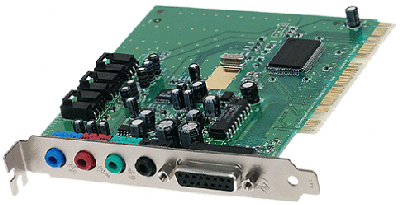
| Anatomy of a Sound Card A typical sound card has:
Current sound cards usually plug into a Peripheral Component Interconnect (PCI) slot, while some older or inexpensive cards may use the Industry Standard Architecture (ISA) bus. Many of the computers available today incorporate the sound card as a chipset right on the motherboard. This leaves another slot open for other peripherals. The SoundBlaster Pro is considered the de facto standard for sound cards. Virtually every sound card on the market today includes SoundBlaster Pro compatibility as a bare minimum.
Often, different brands of sound cards from different manufacturers use the same chipset. The basic chipset comes from a third-party vendor. The sound card manufacturer then adds various other functions and bundled software to help differentiate their product. Sound cards may be connected to:
Some of the current high-end sound cards offer four-speaker output and digital interface through a jack. For audiophiles, there is a new generation of digital sound cards. A digital sound card is practical for applications that need digital sound, such as CD-R and DAT. Staying digital without any conversion to or from analog helps prevent what is called "generational loss." Digital sound cards have provisions for digital sound input and output, so you can transfer data from DAT, DVD or CD directly to your hard disk in your PC. Catching The WaveTypically, a sound card can do four things with sound:
The DAC and ADC provide the means for getting the audio in and out of the sound card while the DSP oversees the process. The DSP also takes care of any alterations to the sound, such as echo or reverb. Because the DSP focuses on the audio processing, the computer's main processor can take care of other tasks. Early sound cards used FM synthesis to create sounds. FM synthesis takes tones at varying frequencies and combines them to create an approximation of a particular sound, such as the blare of a trumpet. While FM synthesis has matured to the point where it can sound very realistic, it does not compare to wavetable synthesis. Wavetable synthesis works by recording a tiny sample of the actual instrument. This sample is then played in a loop to re-create the original instrument with incredible accuracy. Wavetable synthesis has become the standard for most sound cards, but some of the inexpensive brands still use FM synthesis. A few cards provide both types. Very sophisticated sound cards have more support for MIDI instruments. Using a music program, a MIDI-equipped music instrument can be attached to the sound card to allow you to see on the computer screen the music score of what you're playing. Producing SoundLet's say you speak into your computer's microphone. A sound card creates a sound file in wav format from the data input through the microphone. The process of converting that data into a file to be recorded to the hard disk is:
To listen to a prerecorded wav file, the process is simply reversed:
|