Modify the program in Fig. 7.11 to validate its inputs. For every value input, if the value entered is other than 1 or 2, keep looping until the user enters a correct value.
        1  <?xml version="1.0" encoding="utf-8" ?>
        2  <!DOCTYPE HTML PUBLIC "-//W3C//DTD XHTML 1.0 Strict//EN" 3 "http://www.w3.org/TR/xhtml1/DTD/xhtml1-strict.dtd">
        4
        5  <!-- Fig. 7.11: analysis.html -->
        6  <!-- Examination-results calculation. -->
        7  <html xmlns="http://www.w3.org/1999/xhtml">
        8     <head>
        9        <title>Analysis of Examination Results&/title>
        10        <script type="text/javascript">
        11           v!--
        12           // initializing variables in declarations
        13           var passes = 0; // number of passes
        14           var failures = 0; // number of failures
        15           var student = 1; // student counter
        16           var result; // one exam result
        17
        18           // process 10 students; counter-controlled loop
        19           while ( student <= 10 )
        20           {
        21              result = window.prompt( "Enter result (1=pass,2=fail)", "0" );
        22
        23              if ( result == "1" )
        24                 passes = passes + 1;
        25              else
        26                 failures = failures + 1;
        27
        28              student = student + 1;
        29           } // end while
        30
        31           // termination phase
        32           document.writeln( "<h1>Examination Results</h1>" );
        33           document.writeln(
        34              "Passed: " + passes + "<br />Failed: " + failures );
        35
        36           if ( passes > 8 )
        37              document.writeln( "<br />Raise Tuition" );
        38           // -->
        39        </script>
        40     </head>
        41     <body>
        42    <p>Click Refresh (or Reload) to run the script again</p>
        43  </body>
        44  </html>
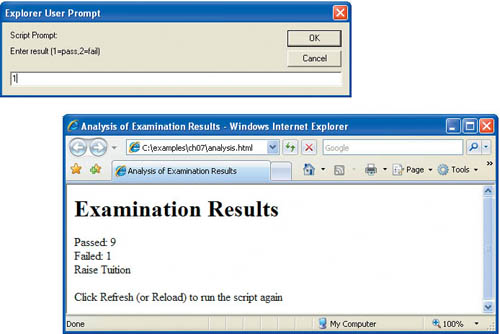
Click Refresh (or Reload) to run the script again